Transportation that moves you

We are Summit County's e‑bikeshare

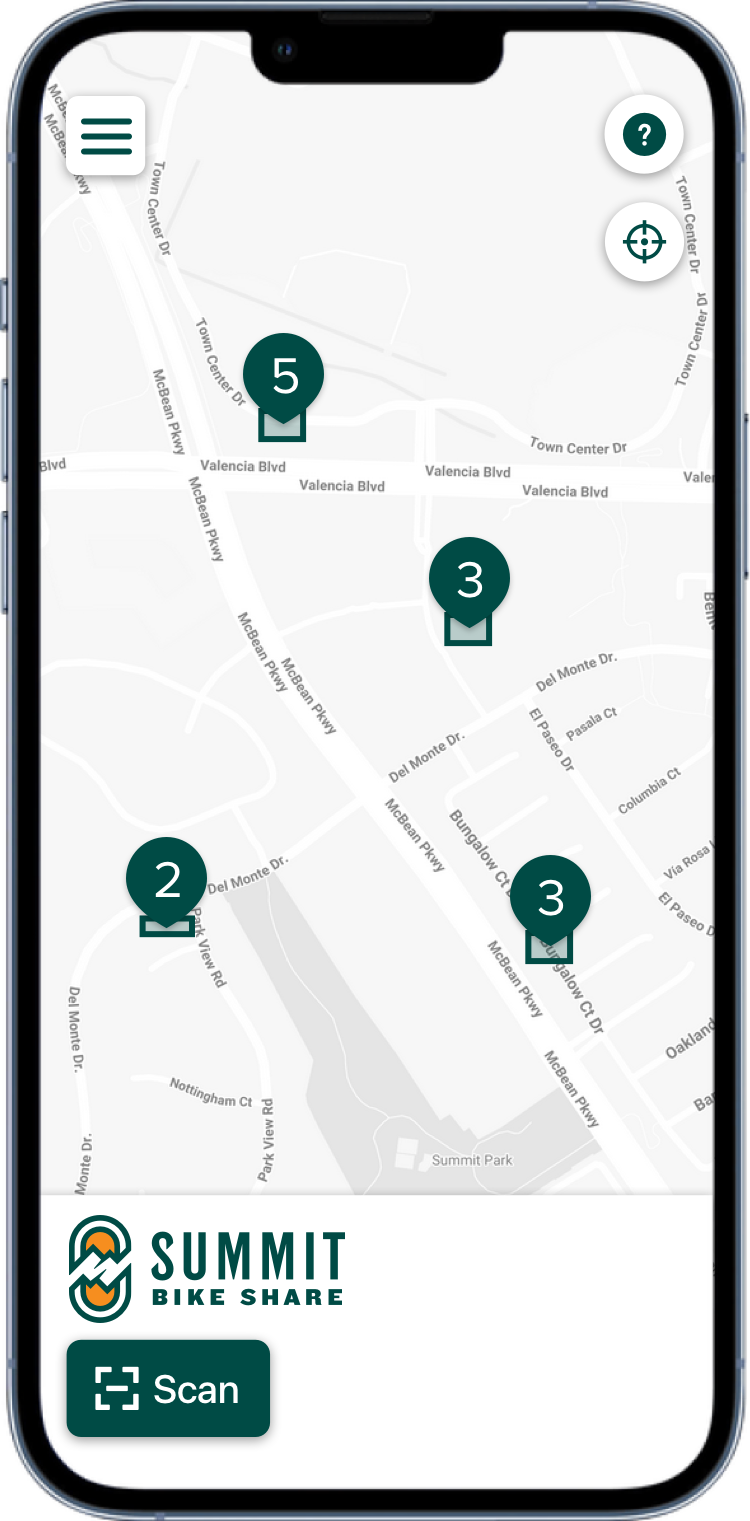
Phone app

Pricing

Summit Bike Share is the affordable and eco‑friendly way to get around.

Whether you're running errands, enjoing world‑class events and recreation, or just riding for fun, we welcome residents and visitors to cruise Summit County with us!

Pay As You Go

$

7

/ unlock

60 minutes of free ride time included

$0.25 per min. after

2 Hour Pass

$

12

/ 2 hours

No unlock fee

120 minutes of free ride time (unlimited trips)

$0.25 per min. after

Season Pass

$

150

$

99

/ season

Locals only

Early bird pricing if purchased by May 15, 2026! Regular price: $150

No unlock fee

120 minutes of free ride time (unlimited trips)

$0.25 per min. after

Discounted memberships are available for community members experiencing financial hardship

  • Eligibility

    The Access Pass is available to anyone currently enrolled in one of the following programs:
      SNAP
      Medicaid
  • Details

      $7 per month
      120 minutes of free ride time (unlimited trips)
      $0.25 per minute after free time
      No unlock fee (even after free time is used up)
  • How to enroll

    1. Download the Summit Bike Share app and enter your phone number, name, and email address.

    2. Tap on the "?" icon on the bottom of the screen to contact customer support.

    3. In the form provided, enter "Access Pass" in the subject line.

    4. Select "Add Image" and take a photo of your SNAP or Medicaid card.

    5. Hit submit. You should receive confirmation of your submission within 24 hours.

    If you have any questions or concerns, please email: support@summitbikeshare.com

How it works

1

Register

Choose your plan and sign up for Summit Bike Share.
2

Release

Tap "Scan" and scan the QR code on the handlebar or bike frame.
3

Ride

Undock the bike or remove the lock tether (make sure to secure the tether to the hook under the seat). Put on your helmet and enjoy the ride.
4

Return

Park and lock the bike at a station. Check the app for instructions.

Get the app now!

The Summit Bike Share mobile app for iPhone and Android is the perfect companion when you're out and about.

Safety

Follow the rules

Yield to pedestrians. Stop at all red lights and stop signs. Ride in the direction of traffic. Use the grip bell to signal your presence. Do not wear more than one earphone while riding. Obey traffic laws at all times.

Plan a sensible route

Plan your route before you ride to follow the safest route to your destination. You can use our app to find your way to a bike you've reserved or to a station when you want to end your ride.

Do a pre-ride check

Adjust the seat height. Test the grip bell and brakes. If riding at night, check that the front and rear lights are illuminated.

Be predictable

Make it easy for the traffic around you. Don't make unexpected turns that put yourself and others in danger. Ride at a steady pace so other vehicles can anticipate your movement.

Wear a helmet

Whenever you ride, wear a helmet. Always buckle the strap. Replace your helmet after any crash and whenever you see signs of damage.

Tips for turns

Use hand signals to let drivers and other cyclists know your intention to turn or stop. Don't turn or change lanes without knowing the position of the cars and bikes around you.

Frequently asked questions

General

  • What is Summit Bike Share?

    Summit Bike Share is an electric, pedal-assist bike share network serving the residents and visitors of Summit County, Utah.
  • What are pedal-assist e‑bikes?

    Pedal-assist e‑bikes ride like any other bicycle. Use the pedals to get moving and squeeze the brakes on the handlebars to slow or come to a stop. As you pedal, a small electric motor adds power to boost momentum, making it easier to go long distances or ride up steep climbs.
  • What is the max speed of a Summit Bike Share e‑bike?

    Summit Bike Share e‑bikes can reach a maximum speed of about 15 miles per hour.
  • I want to ride a Summit Bike Share e‑bike. How do I get started?

    First, you need to download our app and create an account. The Summit Bike Share app is available for Apple IOS and Android. Once you have downloaded the app, you will just need to verify your phone number, enter your name and email address and agree to the terms of service. Our app requires access to your phone’s Bluetooth, location, and camera. We also recommend that you verify your email address so you can receive email receipts of your trips.
  • How do I book a Summit Bike Share e‑bike?

    Once you set up your account, you can use the app to find a nearby station with available bikes. At the station, use your app to scan the QR code located on the rear wheel of the bike or on the small plate between the handlebars. You will need to select a rate plan and add a credit or debit card to your account when you scan a bike for the first time.
  • How do I unlock a Summit Bike Share e‑bike?

    There are two different types of bikes in the Summit Bike Share network. There are the classic bikes that are docked in stations by the front wheel, and there are new version bikes that are locked to bike racks using the tether on the rear of the bike. After you’ve scanned the bike and started the trip, tap on the unlock button. For the classic bikes you then pull the front wheel out of the station. For the new version bikes, remove the tether from the lock port and secure the end loop to the hook under the seat. This keeps the tether from tangling in the rear spokes during your ride.
  • Is there anything else I should do before riding a Summit Bike Share e‑bike?

    Before beginning a trip, use the app to identify a convenient bike station to end your ride. All trips must end at a station If needed, you can adjust the seat height for comfort. Always be sure to test the brakes before going on your way and don’t forget to wear a helmet.
  • What is a bike station?

    Stations are officially designated parking areas that are highlighted on the service area map in the Summit Bike Share app. All trips must end at a station.
  • How do I end my trip?

    To end your trip, check the Trip Screen in the app to find a nearby station. For the classic docking bikes, push the front wheel into the docking station until it locks into place. After docking, follow the steps in the app to end your trip. For the new version bike, wrap the tether around the bike rack and insert it into the lock port on the rear of the bike. Then follow instructions in the app to end your trip. Please make sure the photo is taken from the rear, clearly showing that the bike is securely parked.
  • How much does it cost to use a Summit Bike Share e‑bike?

    Our standard rate is “Pay as You Go.” With this plan, you pay $7.00 to unlock the bike and ride for 1 hour, after which you are charged $0.25 per minute until you dock the bike.
    The “2 Hour Pass” is $12 and provides unlimited unlocks and 120 minutes of ride time. This plan is ideal for riders that might make multiple short trips over several hours or need to get to and from an event where parking is limited. If you need to continue riding past the 2‑hour limit, you will be charged $0.25 min until you dock the bike.
    For locals planning to use the bike share for commuting, regular exercise, or just enjoying the paved trails and scenery, you can purchase a season pass for $150. With the season pass you have no unlock fees and 120 minutes of ride time per day. After 2 hours of riding, you will be charged $0.25/min until you dock the bike.
    There are also discounted memberships for low-income riders. For more information on eligibility and how to apply, email us at support@summitbikeshare.com
  • What is the service area?

    The service area is the bordered zone on the Summit Bike Share app. Avoid riding outside of the service area and refrain from leaving bikes outside of it as well. Bikes stranded outside of the service area are subject to higher penalty fees.
  • Do I have to wear a helmet?

    Summit Bike Share strongly recommends that all riders wear a helmet.
  • Is there a minimum age to ride a Summit Bike Share e‑bike?

    All riders must be at least 18 years of age.
  • Can I book more than one Summit Bike Share e‑bike at a time?

    In order to secure our network, only one bike can be checked out per rider. Any additional riders in your group will need to download the app on their phone to check out a bike.
  • What if I have questions or issues?

    You may contact us via support@summitbikeshare.com or by tapping the “?” icon in the bottom right of the app.

Advanced

  • How long does the boost last on a fully charged Summit Bike Share e‑bike?

    Depending on the weight of the rider, the ride distance, and elevation changes of the ride, the boost should last anywhere up to 2.5 hours of ride time.
  • Do Summit Bike Share e‑bikes work when the battery loses its charge?

    Summit Bike Share e‑bikes are designed to be ridden as normal pedal bikes if the boost runs out. It is not as easy to ride without the pedal assist, but it will still get you around town.
  • Can I make a mid trip stop outside of a hub?

    Yes, you can. For the classic docking bike, use the cable in the basket to secure the bike to a rack or post, and insert the cable end into the port on the right side of the front wheel. For the new version bike, wrap the tether around a bike rack and insert it in the lock port on the rear of the bike. While the bike is locked, no one else can book the bike, but you will be charged normal usage rates. After you have run your errand, choose to unlock the bike in the app to ride to your destination station.
  • Can I ride outside of the service area?

    All bikes must remain in the Summit Bike Share service area at all times.
  • How can I review my trip charges?

    To receive email receipts of trip charges, you need to verify your email address.
  • How do I verify my email address?

    To verify your email address, tap on “Email verification” in the upper left corner of the app. Tap on “Send verification code.” The next screen will provide you with the field to enter the code. You will be sent an email verification code to the email address on file. Enter that code in the field provided in the app, and moving forward you will receive trip receipts after each of your rides.
  • Are there other fees associated with use of Summit Bike Share e‑bikes?

    For Pay as You Go riders there is a $10 hold placed on credit or debit cards. These holds will be immediately released at the end of your trip, but it might take several days to appear on your credit card statement.
    There are also penalty fees that may be applied to your account for misuse of the service:
    • Bike stranded out of service area = $50.00
    • Bike stranded out of hub = $15.00
    • Bike improperly parked or no end of trip photo provided = $10.00
    • Bike left unlocked = $35.00
    • Stolen vehicle recovery = $100.00
    • Loss of bike due to theft or damage = $2,000.00
  • Is there a minimum or maximum height?

    With our adjustable seats, our bikes can be ridden comfortably by anyone between 5’ and 6’5"
  • Is there a maximum weight limit?

    We do not recommend riding our bikes if you exceed 250lbs.

Troubleshooting

  • How do I remove the cable from the front wheel of the classic docking bike?

    To remove the cable from the front wheel, press the “Bike not unlocked?” button in the app and listen for the unlock sound. Then push the cable inward and upwards before pulling it out. If it does not come out, you can use the "Retry unlock" button in the app before repeating this process.
  • What do I do if there is a mechanical issue with the bike?

    Please report any mechanical issues with the bike to customer support by tapping on the “?” icon in the lower right corner or the app. If the mechanical issue makes the bike unsafe to ride, please lock the bike to the nearest available bike rack and notify support. Please note, the loss of pedal assistance is not a mechanical issue.
  • What do I do if the bike loses pedal assistance?

    Fortunately, our bikes are designed to be ridden as regular pedal bikes. If you do not wish to continue your trip without pedal assistance, ride to the nearest hub to end your trip and locate a new bike to book.
  • What do I do if I cannot end the trip?

    Follow the app instructions to end the trip. If this does not work, notify customer support by going back to the map view in the app and tapping on the “?” icon in the lower right corner. Our fleet team will be dispatched to secure the vehicle. You do not need to stay with the bike. We will be able to end the trip for you and make adjustments to the trip cost.

Sponsors